Showing posts with label BlackBerry. Show all posts

05 December 2011

BlackOps: Google Sync adding entries to BBM Groups instead of default calendar fix

If you are experiencing a problem with your Google Sync and the BB Calendar where everything is being added to the BBM Groups calendar, I can help.

This was first experienced for me on my BlackBerry Torch 9800 with OS6 and the source of the problem is a conflict between Google Sync and BBM. The quickfix is to uninstall BBM and then reset your calendar sync and then reinstall BBM.

Here are the steps in detail:

  1. Backup your BBM contacts etc. and then remove BBM. In OS6 go to Options --> Device --> Application Management --> BlackBerry Messenger --> Delete
    1. Note: some users experienced difficulties deleting BlackBerry Messenger; in such cases first try to install the latest version available from the BlackBerry App World and then delete it from there; for some reason the default "core" installation bundled with the OS isn't removable.
  2. Consult http://brattex.blogspot.com/2011/05/blackops-that-google-calendar-syncing.html for initial steps and for methods to backup your calendar. You can skip the steps on deleting service books (i.e. do not do steps 3 and 5) but follow the rest.
  3. After you've run Google Sync and verified that it's all in your default calendar ... reinstall BBM.
I would be really interested to know if this solution worked for you so please feel free to leave a comment below or give this a thumbs up, +1, like, etc.

01 September 2011

BlackApps: RWC 2011 by iRB

The greatest sporting event of the year is almost upon us! Rugby World Cup 2011 is only weeks away and now is the time of mobile apps!

If you own a BlackBerry, love rugby, want to follow the Rugby World Cup in detail, or just want to overload your phone with trending apps, then the RWC 2011 app is for you.

It can be downloaded over here: http://appworld.blackberry.com/webstore/content/54515?lang=en

Features include:

  • Add fixtures for any match to your built-in calendar or add all the fixtures for your favourite team
  • BBM6 integration (requires an upgrade of your BBM if you haven't already done so) provides real-time content sharing, automatic status updates, and live match in-app chat.
  • Access the Match Centre for live match coverage, including real-time live commentary, stats and video highlights.
  • Get the latest news and keep up to date with the RWC 2011 Daily video.
You have no excuse - download it now!

24 May 2011

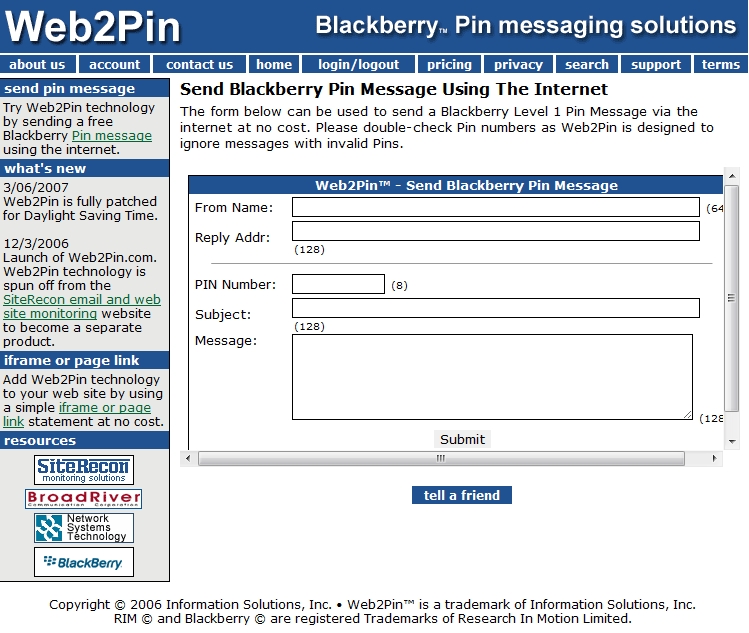
Web2Pin - send BlackBerry PIN messages via the web

If you want to be able to send a PIN message to a BlackBerry user without using a BlackBerry then this web-app is for you... it's called Web2Pin and as long as you know the recipient's unique BB PIN* you will effectively be able to "SMS" them a BB Level 1 PIN message for free!

http://www.web2pin.com/web2pinfree.aspx

* To find out a PIN type mypin in a message box on the BlackBerry handset and the autocorrect will pop up with the PIN of the phone.

(I'm interested to see if I can find a way to feed in parameters to this solution to have automated scripts ...)

20 May 2011

BlackBerry, white screens of death, and swollen cellphone batteries

I've touched on this before but this time around my problem has been much more severe. The BlackBerry would white screen almost daily, sometimes more often than that, and I wouldn't be able to reuse the phone until I had taken out the battery and rebooted while plugged into power. This hinted at a battery problem but I wasn't entirely sure so I first tried to reinstall the OS to see if that fixed it. It didn't. After some more troubleshooting etc. I've since replaced the battery and that seems to have solved the problem.

Interestingly, when I removed the old battery I noticed it was slightly swollen in the centre which I had always thought was normal, but it actually turns out this is the sign of an overcharged battery. Although most of the sites I've referred to say it's not dangerous, they all agree it can't be fixed.

A simple rule of thumb (pardon the pun) is if you can spin your battery on a flat surface and it spins for quite a while, it's got a bit of a swell which means damaged cells. If you spin the battery for about half a rotation before the friction slows it down then the battery is pretty much flat (physically, not chemically) and that's fine.

So if you're having white screen problems on your BB similar to mine, try checking out your battery.

Go on, give it a spin!

19 May 2011

BlackOps: That GOOGLE Calendar syncing feeling (and how to remove that pesky BB Default Calendar)

[ UPDATE: you can also try "RSET" in step 4.1 below ]


[ UPDATE 2011-12-05: have added in steps for OS6 ]

(If you're looking for the BBM Groups fix, go here)

Sometimes things can go wrong when you're sync'ing your BlackBerry calendar with your GOOGLE account and when things do go wrong, it can be really messy and especially difficult to fix.

Let's presume you're having one of the following problems:

  • Multiple entries in your GOOGLE / BlackBerry CALENDAR
  • Synchronising not working properly
  • Need to reinstall calendars
  • Migrated accounts
  • Have a pesky DEFAULT calendar you want to remove
There are a few things you can do to fix these problems.

17 May 2011

BlackBerry madness UNLEASHED!

In my life, if there’s one thing I’ve learnt, it’s that when it rains, it pours.

Take my BlackBerry for example: my mail server died about a week ago and was just brought up again on a new DNS and at the very same time migrated over to a GOOGLE APPS server, so my mail server is now sparkling new and shiny (and oh so nice). 
A mail server migration is in itself quite a big thing. Tack on a faulty cellphone that is white screening all the time since Easter (which may or may not be related to my long drive to Cradock during which time my phone battery died [from being on GPS constantly] and hasn’t been the same since) and also the timely opportunity to upgrade my contract (and get a new phone) and face the slow conclusion to my twenty-four month warranty on said faulty phone. All in all, I’d say it’s pouring! 
To have a faulty phone is bad enough. 
To have a mail server die is bad enough. 
To migrate a mail server is nerve-wracking enough. 
To have to endure South African "service" and figure out what upgrade to take is frustrating enough. 
To have to service a phone before its warranty expires is inconvenient enough. 
Add these all together in the space of one week and you have a nightmarish storm of grand proportions. My life isn't raining - it isn't pouring - it’s hailing!
With such epic storm clouds come some rather epic silver linings and for those out there that use BlackBerry handsets, expect a flurry of posts from me with tips and tricks for your handset. If you're a Sa'ffer then all the better for you because these should hopefully make your life with a BlackBerry all the more interesting.
So please don't overlook my BlackBerry tips 'n' tricks section, which I've affectionately called "BlackOps".


Coming soon!

12 November 2010

BlackApps: ScreenShot FREE

Enter my second installment of BlackBerry App reviews: ScreenShot FREE by S4BB Limited.

For the full list of BlackApp options, visit http://tinyurl.com/BlackApps or go to https://spreadsheets3.google.com/ccc?key=tzaQAeEd4i1RrTG4_ZO5Klw&hl=en_GB#gid=4


Vendor explanation:

With ScreenShot you can take a screen shot of your current BlackBerry® screen with just one click.

Features:
* Takes screen shots and saves them on the sd card / internal memory
* Illustrated how to for setting up ScreenShot on a convenience key for 1-click screen shot taking
* Real camera shutter sound
* After screen shot is taken it can be sent by email easily
* No time limitation

* This FREE version DOES NOT allow for program options change - if you want to do the following, please purchase FULL version.
http://appworld.blackberry.com/webstore/content/3301

* Screen shots can be queued up for easy batch sending by email
* No branding in screen shot
* Options can be adjusted:
-- File name conventions
-- Alert settings (camera sound, vibration, dialog can be turned on/off)
-- Time delay before screen shot is taken
-- Image format (PNG, BMP, GIF, JPEG, TIFF, WBMP)
-- Storage settings: custom directory

What it all means is that you get a free ScreenShot app to use on your BB. It will take shots and save them to your SD card and make a camera shutter sound when it takes the shot. You can then email the resultant file as an attachment. If you want to pay up, you get a host of additional options and features, including choosing file formats for your images and custom directories for saving the files. Of course, the FREE version watermarks the pictures, which is a downside with this app, but it still does the job and while somewhat limited, the FREE version still allows you to incorporate a convenience key and is integrated into your BB menu button.


PRO's of the FREE version:

  • FREE
  • Easy to use
  • Integrated into menu
  • Can email screenshots
  • Supports convenience key
CON's
  • Watermark
  • Relatively large when compared to alternatives
  • There appear to be better alternatives, but I haven't reviewed them yet.
ScreenShot FREE can be located here:

S4BB Limited can be located here:

BlackApps: SMSRelay

I have a confession to make: despite owning a BlackBerry handset for almost six years I didn't really bother with BlackBerry App's until about two weeks ago, and since I started to dig into them I've found quite a few that are really fantastic - almost ESSENTIAL (oh boy, here BrYan goes again).

I've decided to entitle my series of BlackBerry App reviews "BlackApps" because it sounds cool :)

My first BlackApp review is going to be about SMSRelay by Manse eSolutions Inc. 

23 October 2010

Blackberry Messenger

‎​There should be a law against idiots using BlackBerry phones. Sadly, as the BB community grows, the old grizzled veterans like me start realising more and more how people are grabbing BB handsets for toys and they're totally oblivious to the BB's actual power. I beseech thee, if you aren't running the latest BBM, upgrade NOW! http://www.blackberry.com/messenger

14 December 2009

Blackberry Messenger 5 download

Anyone that knows  me probably knows my story about BlackBerry devices. I have owned one for five years now and counting, and over the years I've managed to convince others to take the delve into the Black divide ("once you go BlackBerry, you won't go back" or something to that effect). My most recent handset has been the 8900 Curve "Javelin", and when I migrated from my 8707v it somehow decided that the BlackBerry Messenger on the 8900 wasn't right, removed it, tried to put my 8707v Messenger on, figured it wasn't compatible, and broke. I was stuck without the Messenger, and became the laughing stock of my contemporaries. No matter. I persevered without it, relied heavily on GOOGLE TALK for BlackBerry, and occassionally kept an eye out for an OTA downloadable version for Messenger, which never seemed to be there (with some stupid excuse that it was available on the supplied CD bundled with the phone, or available through the Desktop software, which is both rot).

24 August 2009

BlackBerry Curve 8900 "Javelin" white screen of death

[ UPDATE: also check out this post for possible solutions ]

I suppose it was inevitable that the BlackBerry would also succumb to a bizarre "SOD", and I suppose a WHITE screen is the most appropriate, since it's the opposite of the BLACKberry's style. I just didn't anticipate to experience such a glitch with my evergreen and ever-reliable BlackBerry handset. Doing a search on the internet revealed that I'm not the only person with this problem, but what has surprised me the most is what's causing it...

Strangely, I've only ever noticed it when I've had it resting on my pile of papers on my desk in my office. The most strange thing about it is that it seemed to start with Google Talk, but soon migrated its way to any application that I was using.

For some reason, it would look like it lost a display signal, and artefacts would occur all over the show, but it was almost still visible sometimes. Then, when it blanked out, I'd have to move my phone aside and let it rest while I carried on with my other work, and over some time it would come back.

This went on for a few weeks on-and-off (but only in my office in front of my keyboard) when I discovered the cause... at least, I'd be prepared to bet my BlackBerry on this being the cause.

Underneath my pile of paper, but near-enough to the top of the stack to be near or in contact with my BlackBerry 8900, is the very plastic CD sleeve that came bundled with the BlackBerry software CD (see image).


I've since established that when my phone is near or in contact with this very CD sleeve, it will experience its WSOD, but ONLY then.

I have no explanation for this, except that maybe the plastic is causing some static interference with the phone, but when it's not near or on the plastic, the phone is fine, and I've yet to experience the same WSOD symptoms!

I can't understand it, but there you have it. Hopefully this will make someone's life a little simpler :)

17 June 2009

Blackberry Curve 8900 new GROUP features for contacts

(DISCLAIMER: Anything to do with my new BlackBerry may be old news for some, but since I've moved from an 8707v to an 8900 the leap has been massive. I'm presuming this is all around new stuff, but if not, don't flame me)

Sweet BlackBerry goodness!

When I ran my import from my old BlackBerry 8707v to my new BlackBerry 8900 Curve, I didn't get my mailing lists / groups imported, and to my frustration I had no idea why.

Having attempted to create a new group / list today, I have now got a better idea as to why it may not have worked, and I can assure you it's more for good reason than for bad reason.

When I started my new group, I opted to add a contact, and was very surprised to discover that I could add either their number or a PIN or an email address. That got me thinking, and I tried to add the same contact twice, once with email, and once with a cell number, and voila! It worked!

This means with the new BB OS v4.6 I can have one mailing list, and if I choose to compose an email to the group, it ONLY sends to the valid email addresses, and if I send an SMS, only to the valid SMS recipients, and a PIN only to the valid PIN recipients. What a joy!

Upon trying this out, I noticed that the group SMS service also shows individual progress meters for each recipient of an SMS - so you know who's getting it as they get it - SWEET!

I've now managed to send an email to my group, and it says "not everyone can receive an email" and I click OK, and it sends out the email, IGNORING the SMS recipients. Vice versa for sending an SMS to email addresses in the list.

Some may argue that it should be smart and send it all at once to the proper recipient, but I prefer it this way. Now I can have one mailing list which has everyone's contact details and depending on how I want to contact the people, I can reach them via PIN, SMS, or email. The only snag is that you have to manually capture a single contact multiple times if you want to add their various contact details - not so bad because then at least if they have three cellphone numbers attached to their contact details, you only need to add the one you SMS, and not have the phone think it should SMS them three times (once to each number).