Showing posts with label Internet. Show all posts

20 January 2012

Download YouTube to MP3 using YouTube MP3 and many others

If you've ever wanted to download a YouTube video's soundtrack to 'high-quality' MP3 there are a few sites to visit to achieve this which I've listed below. If you use Google Chrome you can also choose to install an add-on that will allow you to do the download at the click of a button while viewing the YouTube video. The add-on is called, creatively, YouTube MP3 and can be downloaded here http://www.youtube-mp3.org/addons/chrome.

If you want to use a web interface then try out these sites:

  • www.youtube-mp3.org/ the parent site for the Chrome add-on
  • www.listentoyoutube.com/
  • www.video2mp3.net/
  • www.vidtomp3.com/

There are of course plenty more that are just a quick Google search away and also a bunch of add-ons for other browsers - this is simply to point you in the right direction (and if you didn't know it was possible beforehand, now you know!).

Enjoy downloading your favorite Rebecca Black tracks this Friday!

17 January 2012

NeoGo - 24GB mobile data + USB modem for R799 once-off


"Best prepaid deal" in South Africa at the moment, although there's no mention of the speed for the modem. Either way, 24GB of data for R799 (including the modem) is a very good price. That's R33 a GB which is equivalent (almost) to Afrihost's R29 per GB for ADSL. Just be aware that the modem is CDMA which is a lot less connected in South Africa than 3G...

17 November 2011

Sending an e-mail to Twitter, receiving Twitter to e-mail

I can get lazy sometimes, and if there's one thing I can guarantee it's that my email account will always be open and readily available. I can't always say the same for my Twitter account. That's because I'm lazy.

I've found a way to overcome my laziness with an e-mail to Twitter solution that allows me to tweet from the comfort of my mailbox.

TwitterMail (@TwitterMail or https://twitter.com/#!/TwitterMail)


TwitterMail allows you to send an email to a specific Twittermail email (for example, abc123@twittermail.com) which then tweets it to your associated Twitter account. Better yet, you can also receive tweets sent to your username (@twittername) via email.

The problem is privacy. For TwitterMail to work you need to share your twitter account with them. For some people, this may be a problem. For others (like me), it's not such a big deal because it's not like a rogue Twitter thief would be able to do much with my Twitter account anyway!

For a bit of piece of mind, it uses The Visitor Widget to authenticate on http://twittercounter.com/pages/twittermail without sharing your Twitter password (which allows the application to read tweets from your timeline, see who you follow, follow new people, update your profile, and post tweets for you; it will not be able to access your direct messages or see your Twitter password). You can also revoke access at any time by going to your Applications tab of your Settings page - good enough?

Additional features of TwitterMail include:

07 November 2011

Playlist Central - Free music streaming for South Africa on cellphone or PC

[ UPDATE 2011-11-07: 
Under the "more" button at the top you can generate a random playlist from 5 to 50 songs from 'any' genre and year. There is also support for cellphone streaming and ... interestingly ... uploading songs?


UPDATE 2011-12-05:
I noticed a few weeks ago that this site was no longer accessible and now when you go there it says "account suspended" so I guess it's back to the old drawing board, or www.grooveshark.com for your music fix :)


END OF UPDATE ]


When I was in the U.S.A. I was overwhelmingly convinced that Pandora music service would be the next big thing to hit the world of internet music streaming. When I returned to South Africa I was heartbroken to discover that it's limited to U.S.A. and I would never be able to partake of the juicy goodness that lies in Pandora outside of the States.

Almost two years later, a poor substitute has surfaced in South Africa called Playlist Central which boasts (at time of post) more than 76GB of 64Kbps MP3 music (that adds up to more than 1200 artists, 2900 albums, almost forty thousand songs, or in other language - one thousand two hundred hours [forty nine days of non-stop music]) that is free-to-play online.

Some may argue that forty thousand free-to-play songs online for South Africans isn't a poor substitute but clearly those 'some' haven't tried out Pandora! Since this post isn't about Pandora I won't do a comparison and will focus more on Playlist Central and what it offers in a South African context.

Playlist Central is currently in a beta offering but from what I've tried in the afore-mentioned context of available South Africa services it's fantastic. Sporting a range of artists from A-Z including the likes of Abba, Seether, Breaking Benjamin, Adele, and Sepultura there's sure to be something for everyone.

07 October 2011

Google goes promiscuous?


Today when signing up for a new account on Google I noticed that there are now a few more options to sign up with besides just the standard creation of a new Google Account.

Actually, let me rephrase that - it seems that one can now have a Google Account / identity which isn't *@googlemail.com or *@gmail.com.

Observe:

24 May 2011

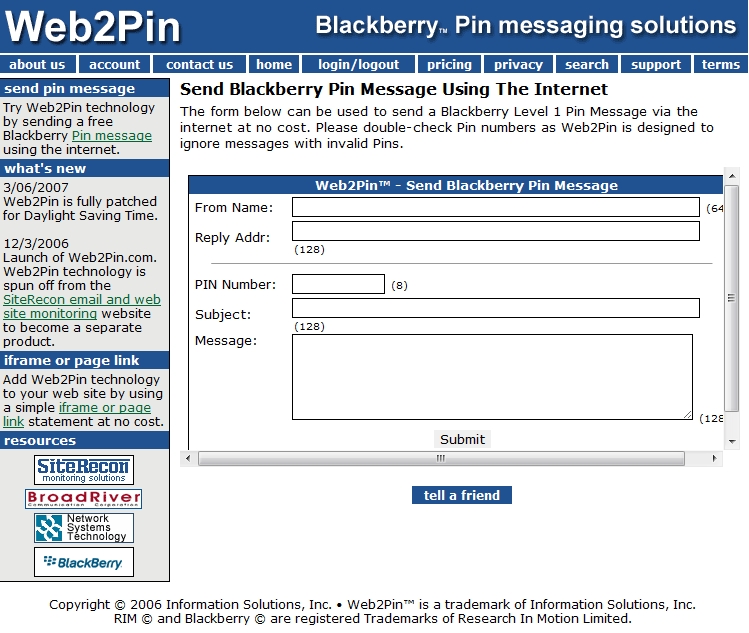
Web2Pin - send BlackBerry PIN messages via the web

If you want to be able to send a PIN message to a BlackBerry user without using a BlackBerry then this web-app is for you... it's called Web2Pin and as long as you know the recipient's unique BB PIN* you will effectively be able to "SMS" them a BB Level 1 PIN message for free!

http://www.web2pin.com/web2pinfree.aspx

* To find out a PIN type mypin in a message box on the BlackBerry handset and the autocorrect will pop up with the PIN of the phone.

(I'm interested to see if I can find a way to feed in parameters to this solution to have automated scripts ...)

03 May 2011

Free Online Rugby Magazine

If you're an avid fan of rugby and also happen to be a nasty cheapskate, then check out the online RUGBY Mentor magazine. You'll need to register first but then expect your mailbox to be spammed every once in a while with an e-magazine about rugby!

28 February 2011

Flickr FREE account - making it work

Flickr is a great service for storing online photographs. First of all, it's FREE and allows unlimited storage and you can always download the original sized images to boot. Of course, despite these fantastic features, the FREE service is limited to 300MB uploads a month and also only being able to see the most recent 500 uploads on your photostream; the old uploads are still there but are lost on the photostream and Flickr hopes you'll cough up the $24 per year to get them back on your photostream again.

If you wanted to be REALLY cheap (which I can be :)) you could track every URL of every picture you've ever uploaded and never need to become a paying customer (but that really is kind of cheap, especially since Flickr isn't all too pricey anyway). I won't go on about all the alternative photo-sharing sites available in this post, however, because there ARE alternatives, but since I am a fan of FLICKR (and have been since well before Flickr took over YAHOO Photo's), I am going to focus on a few tricks I've developed to keep my free account alive and working for me.

The basic concept is simple: you upload your pictures in batches every month (and if you take more than 300MB of decent photo's in a month this won't really work out for you and you'll need to buy into Flickr's service, which I think is what they expect to be the case) and then you copy and paste the picture URLs into a spreadsheet for easy referral later on. I've set up a GOOGLE SPREADSHEET for this and I have categories and sub-categories so it's easy to search for what I want, and then just hit the URL to load up the picture (if it's lost on my photostream).

The problem comes in when you have to manually copy and paste one hundred shortcuts; this can be REALLY time consuming, so instead I've set up a basic EXCEL MACRO to do most of the work for me. It's still a bit laborious, but to save $2 a month is worth the satisfaction for me, although truth be told I am only moments away from becoming a paying subscriber because I really don't like the monthly upload limitations for the FREE account.

Anyway, I digress: the point is, you can keep your FREE account alive and kicking using the following tricks that I've hacked together.

05 November 2010

Google Chrome Options

I've recently taken the plunge to Windows 7 from Windows VISTA (yes, I know... enough said about that the better), and I have had to re-install GOOGLE CHROME (although I still think FIREFOX is my favorite browser ATM). With the new installation comes the usual tweaks, and here are the ones that I recommend you put in place before using CHROME extensively, since they are quite useful and in some respects ESSENTIAL tweaks:

Under Google Chrome Options

  • Basics
    • On startup: reopen the pages that were open last
  • Personal Stuff
    • Sync: if you want to set this up to synchronise across CHROME sessions on various PCs
  • Under the Hood
    • Download location: "ask where to save each file before downloading"
And that's about it. Gosh, I thought there would be more before I started to post this. That's quite embarrassing. Well at least the blog is living up to its purpose: being a reminder to me for things I need reminding of! 

Okay, um... then how about those CHROME TOOLS, huh? Some essential ones (IMHO) are:
Do you recommend any others?

30 October 2010

Taking full advantage of Afrihost's FREE 1GB offer

(want to save on AFRIHOST? http://tinyurl.com/AFRIHOSTsavings)

I may be a Christian (in fact, I am a Christian), which means I am an honest guy as far as I can help it, but it doesn't stop me from still being blessed (or cursed?) with a crafty mind.

You see, free things and me go together like mustard sauce and a boerie roll. If there's a way to score free stuff, or to save, I'll figure it out.

So with the latest craze of free ADSL bandwidth being dished out by AFRIHOST, I came to realise that if you are already an AFRIHOST subscriber, you get 1GB free every month automatically now. What else I already know is if you are buying 1GB or 2GB or 5GB from AFRIHOST per month, it costs nothing different per GB. In fact, as I've always advised my customers and friends: rather just get the 1GB AFRIHOST account and opt for an auto-top-up to your preferred limit. That's the first and most honest way to save money with AFRIHOST.

The second money-saving tip is this one:

With AFRIHOST dishing out free 1GB to every existing customer, everyone already wins if they're a member of the AFRIHOST Elite. For some, like me, I happen to have TWO 1GB accounts under my name, so when this special kicked in, I scored 2 free GB of bandwidth (and I don't think it's port-locked since the contracted accounts let you have concurrent logins) - this translates to 2 * 1GB bandwidth usable ANYWHERE!
  • The 1GB FREE ADSL is port-locked to a specific number so you can't use it outside of the number you registered it for
  • Existing subscribers also get 1GB additional and it goes onto your existing contract which in my case is NOT port-locked and supports concurrent logins.
  • If you run 2 * 1GB accounts it's the same cost as running 1 * 2GB account.
    A more extreme example,:if you run 5 * 1GB accounts it's the same cost as running 1 * 5GB account.

    The bonus comes in with the way this special is implemented by AFRIHOST:
    • If you have 1 * 2GB account, you get 1GB free = 3GB (2+1) per month now for R58
    • If you have 2 * 1GB accounts, you get 1GB free per account = 4GB (2+2) per month for R58
    • If you have 1 * 5GB account, it's 6GB (5+1) for R145 per month
    • If you have 5 * 1GB accounts, it's 10GB (2+2+2+2+2) for R145 per month
  • See where I'm going?
Another interesting tidbit is you can sign up with GMAIL accounts and use your email address as with the "+" alias, for example:
  • joe_soap@gmail.com
  • joe_soap+2@gmail.com
  • joe_soap+3@gmail.com
And so on, and earn yourself additional free accounts.

Of course, I don't condone exploiting AFRIHOST since it will only kill them and mean we don't get such favorably revolutionary deals in the future, but I do want to point out that if you're a subscriber, WHY are you paying the full amount every month when instead you could just be paying the MINIMUM amount and still not be preventing yourself from the enjoyment of the full service IF and when you use it (at which point you pay for what you use)? Likewise, if you go the economical route, you can actually double your bandwidth per month for FREE and use it concurrently anywhere you like!

29 October 2010

Saving on monthly AFRIHOST bills

[UPDATE: The following only holds true for accounts 5GB and smaller. A 10GB account is R19 per GB, but with R29 per GB top-up after that. So this is now only really applicable for 1,2,3,4,5GB accounts]

Many people subscribe to AFRIHOST because of their (currently) competitive per GB pricing at R29 per GB.

What many subscribers don't seem to realise is that it doesn't pay to subscribe to any account over 1GB, because whether it is 2GB @ R58pm, 5GB @ R145pm, or even 20GB @ R380pm, it still works out at exactly R29 per GB.

The benefit of going the cheaper route of 1GB per month is that you're only tying yourself down to 1GB per month: that means if you don't use bandwidth (i.e. TELKOM is down [again] or you're away on holiday) you're only debited for R29 for the month. If you are doing a higher bandwidth deal, you're being charged the full amount regardless of usage, and there's absolutely no need for this!

AFRIHOST offers an automatic top-up facility (interestingly, this was implemented 3 days after I emailed them about putting this feature in, so they took my comments seriously and responded - another big feather in their cap from my perspective) which enables you to set the limit (and size of your top-up increments) up to 20GB for recaps every month, and this method of, for example, 1GB plus 19*1GB top-ups achieves the same net effect (and total cost) as buying a full 20GB account up front but without the committed cost implications at the beginning of the month JUST IN CASE you don't use it all.

Let me simplify this:

  • Buying 20GB @ R380pm means you are committing the R380 to AFRIHOST every month REGARDLESS of what amount of the 20GB you use - 0.1GB, 2GB, 5GB, 9.3GB will all end up costing you R380 for the month and there is no carry-over of your bandwidth so what you don't use is thrown away completely.
  • Buying 1GB @ R29pm means you are only committing to R29 to AFRIHOST every month REGARDLESS of whether you use 0.1GB, 0.5GB, or 0.9999GB.
    • The real savings come in when you employ the AUTO-TOP-UP feature on the 1GB account, and set the top-up to do 1GB at R29 each time, up to a number of times that you specify (for example, if you are a 5GB subscriber, you'd set it to automatically top-up only four more times at 1GB a time).
This allows you to still get up to the total bandwidth you want every month without any interruptions to your browsing, but with the luxury of knowing that if you don't use it, you don't pay for it (in the 5GB example above, if you used 2.8GB you'd save R29*2 for that month because you wouldn't buy the 4th or 5th GB).

So what are all of you 2GB and higher AFRIHOST subscribers waiting for? Go and downgrade your contract and enable automatic top-ups instead! You'll save yourself money in the long run and it won't possibly cost you anything more than your current bills are DEFINITELY costing you every month!

26 October 2010

Miniature personalised URLs

This isn't a new secret, but it's worth mentioning anyway.

Miniaturising and customising your own URLs is easy and free (at least for now). Check out these sites to get started:

I've already created a short URL to a published GOOGLE DOC which hosts my current curriculum vitae.


A miniaturised URL is a handy piece of information to add to the end of an email and is also easy to remember in a conversation.

22 October 2010

It's X days until ...

If you need to know how many days it is until ... whenever, then you can count the days yourself with a calendar, try to work it out yourself, or cheat and use this handy little tool grabbed from http://www.jarusa.com/daysuntil.htm.


How Many Days Until

How many days until an event?


There are some other handy calculators there too, one of which I've just used work out that I'm 11,555 days old and my 12,000th birth-DAY will be 9 January 2012!


Days Old Calculator

How many days old are you?


04 January 2010

PANDORA

Go to PANDORA Internet Radio if you haven't yet checked it out. This is a really great way to listen to music! Of course, I'm experiencing it from 20Mbps internet access, so it may not be quite as practical in South Africa ... but the concept is awesome, and it will give you exposure to a whole range of artists and songs that perhaps you may never otherwise get a chance to enjoy, but it will still comply with your personal music tastes... hopefully ;) CHECK IT OUT!

UPDATE: It appears that PANDORA won't work in RSA - there are ways around this, and I'll look into them and post updates here, unless anyone has any suggestions to post in the comment. Likewise, Kai, your suggestion doesn't work either. More reason to not enjoy technology in a 3rd world country :( (you'd think they would allow the 3rd worlds a hand-out since we are so technologically backward, the risks are lower here :))

01 October 2009

Google Chrome offline download

This is a brief update for a useful pointer for those that didn't know.

You can download and install Google Chrome via a "standalone" / "offline" install file, located here.

Enjoy!

25 September 2009

Hands-on Tech Tips - you've stolen my dream!

Damn you HTT, damn you for all of your usefulness and helpfulness! I see I now have a real rival in the blogosphere for South African handy tips - and you've got a miles-long head-start on me, and made it to 2nd spot ...

I have to admit it, I am INSANELY jealous right now of how useful this blog is, and of all the tips it posts up. I have a feeling it's my long-lost twin brother running that blog, because that's the sort of scheming mind I have, and he's sharing his truth with the world. You go, buddy! Tell the world!

Check out this really helpful blog: http://handytechtips.blogspot.com/ ... I have to confess it's really handy stuff from what I've seen, and it can apply to a world of people - how to save money on Discovery, hot to get the best prepaid top-up value from the service providers, where to go to get your under-16 kid free movies for a year, etc. Looks really promising :)

15 June 2009

Webpage typo's that are just ... awkward

Wow, did I just get a fright. I wanted to log on and check the latest score update for the IRELAND vs. PAKISTAN T20 cricket match (go Ireland) and did my usual "cricinfo" ctrl+ENTER and left it to load. Coming back a few minutes later, I discovered something a little less than expected...

Lo and behold. No T20 cricket score. Instead I landed up in

International Circumcision Information
Reference Centre

(http://www.circinfo.com/)

Now THAT was unexpected.

06 April 2009

WAP banking - Mobile goodness!


If you want to be able to do pretty cool "internet" banking on the go, then I strongly urge you to experience WAP banking. I was a little cautious at first, but after doing some digging, and realising my bank balances weren't changing after I logged in, I have become quite attached to WAP banking. I call my ABSA WAP service ... WABSA!

You see, there's always been cellphone banking, but it's been horribly unreliable for me, and the SMS thing is great, but SLOW. With the BlackBerry, and with unlimited data plans, and with the ability to switch between applications, I can now do my banking almost as efficiently as if I'm doing it online.

So far I've only been able to review ABSA's service, since I bank with ABSA, but the results are great for me. I can't complain - it does what I need, and it does it pretty fast and pretty reliable!

If you're with ABSA, check out their WAP site and try it out! It's a legitimate link, as you can tell from this ABSA post.

31 March 2009

Free web counters online for BLOGGER

I've been quite curious to see how many people are visiting my blogs. I mean, I've been getting people commenting whom I don't even know from a bar of soap, so I figured it would be a cool ego-boost (and proof that I have an acknowledged existence) if I could verify visits etc.

There are some useful options out there, and I don't even know where to start, because I'm such a perfectionist...

UPDATE: the one to go for is listed at the bottom of the post, and it's STATCOUNTER. Read further if you want to know the details...


Following the advice of this post

Sitemeter looks pretty useful with a web interface for observing stats.
I liked the simplicity of Easy-Hit-Counters but never got around to testing it out because their policies.php page was a dud. Hmmm...

There are also these guys to consider (but I didn't look into them with much vigour):
Freestats.com
Google Analytics

I almost settled on BRAVENET because it offers a CSV download option, and has what seems to be a host of basic functions that I'd like. To register wasn't too complex (by today's standards) and it seems to allow me what I need. There is also a bunch of free tools for web-based stuff, but obviously we're only looking for a free counter right now. I didn't realise it was ad-supported, so that may not be ideal but I tried it out anyway. Alas, I couldn't get the thing to work quickly and easily with my modified template code, so I discarded it to the "almost-winner" category!

Statcounter
This is probably the best service to take, for simplicity of registration but depth of functionality. I was fond of BRAVENET and all its host of features until I discovered it wasn't very XHTML friendly. Statcounter lets you set some nice control, and the blog above recommends using this one (or at least, shows you how to set this one up).
What I especially like about statcounter is that you can keep multiple sites in different projects under one login.
Text / graphics? Pageload / Unique visitor? This site offers a lot of depth AND it has a great tutorial to set up the counter on a BLOGGER site (and many other blog sites!).

GET STATCOUNTER!