IE9 is out. It looks kinda cool too. I haven't played around with it extensively, but from what I've seen, I like. Time will tell whether it is better than Firefox 4, the latest Opera, or Chrome. I should probably put up a head-to-head-to-head-to-head sometime, just for interest's sake.
For now, though, if you want to do an offline install of IE9 it's quite a mission to find the files, so here's a link for your convenience:
http://windows.microsoft.com/en-US/internet-explorer/downloads/ie-9/worldwide-languages
11 April 2011

New Layout
Times change. So too does BLOGGER and, along with it, my blog.
I am moving with the changing times. Kind of. I decided to embrace the new template designer offered by BLOGGER after months of resisting (and also since my old template doesn't always integrate so nicely without me having to hack some CSS or HTML). This is the result. Do you like it? Please vote on the poll ... I don't expect too many responses but hopefully at least one vote will indicate if it's considered an improvement or not :)
* I am not very artistically inclined so if there are horrible clashing colours then vote NO!
To see what my old BLOG looked like, click here:
I am moving with the changing times. Kind of. I decided to embrace the new template designer offered by BLOGGER after months of resisting (and also since my old template doesn't always integrate so nicely without me having to hack some CSS or HTML). This is the result. Do you like it? Please vote on the poll ... I don't expect too many responses but hopefully at least one vote will indicate if it's considered an improvement or not :)
* I am not very artistically inclined so if there are horrible clashing colours then vote NO!
To see what my old BLOG looked like, click here:
Blog This! extension for GOOGLE CHROME
Blog This! : Communicate - Google Chrome Help:
"Post to Blogger with just one click
This extension adds a Blog This! button to the toolbar that you can click to create a new Blogger post. The new post is pre-populated with a link to the web page you're on, as well as any text you've highlighted on that page. Edit the post to your liking and post it instantly to your blog! Learn more about Blogger
To learn more about the extension, visit its homepage in the Extensions Gallery. You can discover even more extensions in the gallery."
This extension adds a Blog This! button to the toolbar that you can click to create a new Blogger post. The new post is pre-populated with a link to the web page you're on, as well as any text you've highlighted on that page. Edit the post to your liking and post it instantly to your blog! Learn more about Blogger
To learn more about the extension, visit its homepage in the Extensions Gallery. You can discover even more extensions in the gallery."
The problem I have with the Blog This! extension is that it's quite a bit watered down when compared to the usual BLOGGER interface. Obviously it's meant to be a quick "click and post" solution but I really don't have a problem with having a tab opened with BLOGGER sitting there ready to go. Well, as far as useful tools go, it's there or thereabouts, I suppose. Time will tell if I actually put it to use.
One problem I've already picked up is the lack of labels support, so that's an annoyance.
PS: I made this post with Blog This!
VODACOM reduced 2GB Broadband pricing
For those that don't follow mybroadband.co.za, VODACOM isn't just giving South Africans a new logo but also new product offerings. Announced recently was VODACOM's 2GB+2GB special which brings broadband pricing to an "as low as" 3.6c per MB. That's quite a big deal for South Africa because only recently it was still R2 per MB on some data packages so this is a 98% reduction in costs.
Basically if you sign up with VODACOM between 1 May and 31 July 2011 you'll be able to secure this deal, including 7.2Mbps modem at R149 per month for 12 months. There is a catch: you get 2GB for use any time and another 2GB for use from midnight to 5am a month. If you don't intend to use the second 2GB batch, then this pricing is "as good as" the CELL C offering, so you can't really lose anyway.
If I've ever been an advocate recommending to you the Cell C 2GB deal, well now you can scratch that and go for the VODACOM deal instead!
A breakdown for the various competitors, courtesy of mybroadband.co.za's news post is below. I can't help but notice the "competitive Telkom pricing" ;-)
Basically if you sign up with VODACOM between 1 May and 31 July 2011 you'll be able to secure this deal, including 7.2Mbps modem at R149 per month for 12 months. There is a catch: you get 2GB for use any time and another 2GB for use from midnight to 5am a month. If you don't intend to use the second 2GB batch, then this pricing is "as good as" the CELL C offering, so you can't really lose anyway.
If I've ever been an advocate recommending to you the Cell C 2GB deal, well now you can scratch that and go for the VODACOM deal instead!
A breakdown for the various competitors, courtesy of mybroadband.co.za's news post is below. I can't help but notice the "competitive Telkom pricing" ;-)
| 2GB Mobile Data Contracts | |||||
| Standard data | Extra data (after 00:00) | Modem | Price (p/m) | Cost/MB | |
| Vodacom 2GB + 2GB | 2GB | 2GB | 7.2Mbps | R149 | R0.036 - R0.073 |
| Cell C 2GB | 2GB | -- | 7.2Mbps | R149 | R0.073 |
| 8ta 2GB | 1.5GB | -- | 7.2Mbps | R280 | R0.19 |
| MTN 2GB | 2GB | -- | 7.2Mbps | R389 | R0.19 |
31 March 2011
DSTV Drifta channels increased
A quick update from News24 has alerted me to the fact that DStv Mobile is increasing its channel offering for DStv Mobile subscribers; now you get CNNi, E! Entertainment, and Sony Max added to the mix.
This brings the total channel offering as of 1 April 2011 to:
This brings the total channel offering as of 1 April 2011 to:
- eNews
- CNNi
- Channel O
- E! Entertainment
- Sony Max
- Africa Magic
- Cartoon Network
- Trace Urban
- SuperSport 1
- SuperSport 2
- SuperSport 3
- SuperSport Blitz
This is becoming a sweeter deal by the month :)
Cost-wise, expect to pay R36 a month unless you want to receive it on a DVB-H phone (bypassing the need for the Drifta receiver) for an extra R9 a week on top of the R36 a month. It's FREE if you have DSTV Premium, and it's also free until 31 March 2012 if you have DSTV Compact and signed up before 1 April 2011.
29 March 2011
Kalahari BIG MAMA SALE
If anyone is interested, there's FREE DELIVERY until the end of March 2011 on Kalahari.net orders, so go over there and check out the merchandise available - and if you're lucky enough to also have a R50 voucher, maybe score yourself something really cheap :)
10 March 2011
DSTV Drifta
"... If you want rugby, then the Drifta will cost you the same price for a year as the DSTV bouquet will cost for a month. Think about that!"
UPDATE June 2012: I've added a dedicated DStv Drifta page for future DStv Drifta information. Find it here or click up top.
[ UPDATE April 2011: J-J.co.za has set up an unofficial yet very comprehensive Drifta FAQ here. Highly recommended! ]
[ UPDATE 31 March 2011: THREE new channels announced for DSTV Drifta! Read about it here. ]
[ UPDATE: the cost per month as at March 2011 is R40pm INCLUDING the insurance if you don't piggy-back an existing DSTV subscription ]
By now most of us living in South Africa have heard of the DSTV mobile solution called the Drifta. It's touted to be a DStv Mobile Decoder and all it really is is a tiny DVB-H receiver. At first I thought it was a cheap gimmick: a tiny device with a tiny screen, but when I learnt that it actually doesn't have a screen at all and instead connects to your iOS devices or your PC / laptop, it caught my attention.
I've since read a few local reviews and snatched one up for a birthday present because on the surface it sounds like it can do the job I'm looking for. If you're interested in finding out whether it really is worth it, read on!
08 March 2011
DHL notification
This has to be one of the worst phishing messages I've seen yet!
-------Original Email-------
Subject :DHL notification
From :mailto:support61m@dhl.com
Date :Tue Mar 08 09:54:06 Africa/Harare 2011
Dear customer.
The parcel was send your home address.
And it will arrice within 7 bussness day.
More information and the tracking number
are attached in document below.
Thank you.
2011 DHL International GmbH.
All rights reserverd.
03 March 2011
DSTV XtraView settings
Setting up XtraView can be quite simple provided you know the configuration options.
Multichoice (AKA "monochoice") used to have a nice PDF with instructions but I can't find them any more - it's like they've been taken off the website. Instead, there's a quick reference guide which - once you've learnt how to read it - seems quite simple to follow. Attached here for your convenience because it's a bit of a mission to actually find it on the DSTV website!
(as an aside, what's with the "xtraview" without the "e"? That's just silly... and so difficult to filter)
Gleaned from http://care.dstv.com/main.aspx?ID=1747&SOR=0115555G
Multichoice (AKA "monochoice") used to have a nice PDF with instructions but I can't find them any more - it's like they've been taken off the website. Instead, there's a quick reference guide which - once you've learnt how to read it - seems quite simple to follow. Attached here for your convenience because it's a bit of a mission to actually find it on the DSTV website!
(as an aside, what's with the "xtraview" without the "e"? That's just silly... and so difficult to filter)
Gleaned from http://care.dstv.com/main.aspx?ID=1747&SOR=0115555G
Settings
| Decoder Combination | Primary DSD | Single View | HD | Single View | HD | HD | |
|---|---|---|---|---|---|---|---|
| Secondary DSD | Single View | Single View | HD | HD | HD | ||
| Primary Decoder | Comm Port | RF In | RF In | RF In | RF In | RF In | |
| Remote mode | TV 1 | TV 1 | TV 1 | TV 1 | TV 1 | ||
| Relay Remote Command | TV 2 | ON | TV 2 | On | On | ||
| Accept Relayed Command | Off | On | Off | On | On | ||
| Secondary Decoder | Comm Port | RF Out | RF Out | RF Out | RF Out | RF Out | |
| Remote mode | TV 2 | TV 2 | TV 2 | · Using SD Remote | · Using HD Remote | TV 2 | |
| Relay Remote Command | Off | Off | On | Off | Off | ||
| Accept Relayed Command | TV 2 | TV 2 | Off | On | Off | ||
02 March 2011
Are you registered for voting?
Last chance to register is this weekend for the local by-elections. If you aren't sure whether or not you're registered, you can visit the IEC website at https://www.elections.org.za/content/Pages/AmIRegistered/VoterRegistrationStatus.aspx and verify your details.
Alternatively, SMS your ID number to 32810 (R1.00 per SMS sent or received),
OR
Call the toll-free (from a landline) number 0800 11 8000.
Do it! Add to the democratic way... AKA the dictatorship by the ignorant masses :)
Alternatively, SMS your ID number to 32810 (R1.00 per SMS sent or received),
OR
Call the toll-free (from a landline) number 0800 11 8000.
Do it! Add to the democratic way... AKA the dictatorship by the ignorant masses :)
28 February 2011
Flickr FREE account - making it work
Flickr is a great service for storing online photographs. First of all, it's FREE and allows unlimited storage and you can always download the original sized images to boot. Of course, despite these fantastic features, the FREE service is limited to 300MB uploads a month and also only being able to see the most recent 500 uploads on your photostream; the old uploads are still there but are lost on the photostream and Flickr hopes you'll cough up the $24 per year to get them back on your photostream again.
If you wanted to be REALLY cheap (which I can be :)) you could track every URL of every picture you've ever uploaded and never need to become a paying customer (but that really is kind of cheap, especially since Flickr isn't all too pricey anyway). I won't go on about all the alternative photo-sharing sites available in this post, however, because there ARE alternatives, but since I am a fan of FLICKR (and have been since well before Flickr took over YAHOO Photo's), I am going to focus on a few tricks I've developed to keep my free account alive and working for me.
The basic concept is simple: you upload your pictures in batches every month (and if you take more than 300MB of decent photo's in a month this won't really work out for you and you'll need to buy into Flickr's service, which I think is what they expect to be the case) and then you copy and paste the picture URLs into a spreadsheet for easy referral later on. I've set up a GOOGLE SPREADSHEET for this and I have categories and sub-categories so it's easy to search for what I want, and then just hit the URL to load up the picture (if it's lost on my photostream).
The problem comes in when you have to manually copy and paste one hundred shortcuts; this can be REALLY time consuming, so instead I've set up a basic EXCEL MACRO to do most of the work for me. It's still a bit laborious, but to save $2 a month is worth the satisfaction for me, although truth be told I am only moments away from becoming a paying subscriber because I really don't like the monthly upload limitations for the FREE account.
Anyway, I digress: the point is, you can keep your FREE account alive and kicking using the following tricks that I've hacked together.
21 February 2011
Free Steam Games List
A buddy of mine reminded me of this site, and he wants to share the love, so I'm sharing the love on my blog :)
http://forums.steampowered.com/forums/showthread.php?t=851573
At the time of writing (and as Oltman points out, last updated 2011/01/23) the list included, amongst others:
For all Steam users:
Alien Swarm: install - storefront
America's Army 3: install - storefront
BattleForge [1][4][7]: install
Between [1][4]: install - storefront
Codename Gordon: install
COIL [1]: install - storefront
Mightier [1]: install - storefront
Moonbase Alpha: install - storefront
Peggle Extreme: install - storefront
Sam & Max: Episode 4: install - storefront
Spacewar: install
TrackMania Nations Forever [2]: install - storefront
http://forums.steampowered.com/forums/showthread.php?t=851573
At the time of writing (and as Oltman points out, last updated 2011/01/23) the list included, amongst others:
For all Steam users:
Alien Swarm: install - storefront
America's Army 3: install - storefront
BattleForge [1][4][7]: install
Between [1][4]: install - storefront
Codename Gordon: install
COIL [1]: install - storefront
Mightier [1]: install - storefront
Moonbase Alpha: install - storefront
Peggle Extreme: install - storefront
Sam & Max: Episode 4: install - storefront
Spacewar: install
TrackMania Nations Forever [2]: install - storefront
Software: DisplayFusion
It's the 21st century now and if you spend your entire (working) life at a computer desk, you'll probably find yourself benefiting from running dual screen. One monitor is your "regular" and "always-on" applications (i.e. email, usually) and the other monitor is your "occasional" applications (i.e. IM, random browsing, and such). If you're a serious I.T. big-wig (i.e. "nerd") then you'll probably find multi-tasking is a whole lot easier with dual-screen: application development or systems administration is just a lot simpler with two or more monitors. The major hurdle is often how to quickly and easily shift displays across, aside, above, below. This is where DisplayFusion steps in!
 |
| Image used without permission but for promotional purposes so it's okay :) |
* if you don't use multi-screen, jump to the bottom of the post for tips on how DisplayFusion can still benefit your sad single-screen life...
DisplayFusion claims that it will "make your multi-monitor life much easier" and it really does! Some of the features include:
- Multi-monitor taskbar
- Advanced Wallpaper Management
- Window Snapping
- ... and so much more
Of course, many of these features come at a price, but for the sake of my post, I will focus on the FREE stuff, since most of my followers (read: friends and family) are cheap-skates :)
- Different image on each monitor
- HotKeys (for move, size, span, "always on top", transparency)
- Includes move to centre, move to next monitor, size and move to bottom/left/right/top
- This is worth the whole application IMHO and is also as useful on a single screen scenario.
- Customisable TitleBar Button
- Toggle Window Edge Snapping
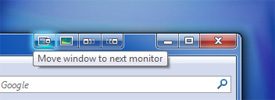
... and like I alluded to earlier: if you don't own multiple screens on your current setup, you should still find the HotKeys for moving and sizing the window very helpful, and I really think this feature alone is worth the download!
16 February 2011
SUPER 15 RUGBY FIXTURES CALENDAR 2011
[ UPDATE: 13 Feb 2012 ]
If you want the 2012 fixtures calendar check out this post: http://brattex.blogspot.com/2012/02/super-15-rugby-fixtures-calendar-2012.html
[ UPDATE: 28 Feb 2011 12:40pm]
There was a glitch with the fixtures for 11 March landing up on 1 March instead. Have fixed that so please update your calendars if it isn't set to synch.
[ UPDATE: 17 Feb 2011 11:40pm]
If you want the 2012 fixtures calendar check out this post: http://brattex.blogspot.com/2012/02/super-15-rugby-fixtures-calendar-2012.html
[ UPDATE: 28 Feb 2011 12:40pm]
There was a glitch with the fixtures for 11 March landing up on 1 March instead. Have fixed that so please update your calendars if it isn't set to synch.
[ UPDATE: 17 Feb 2011 11:40pm]
I've now created a whole new calendar that works properly when importing into GOOGLE CALENDAR, and as an extra bonus I've included the play-offs at the end and the proper durations (i.e. start and stop times) for each match. I'll admit I also considered renaming "Durban" to "Kings Park!!" but decided in the end to try to remain professional in case someone else used my stuff.
Click here to download the CSV file for importing into your favourite calendar application
[ END OF UPDATE: 17 Feb 2011 11:40pm ]
If you want to add the Super Rugby Calendar for 2011 to your (insert technology here) then follow these links to grab the GOOGLE CALENDAR. I've shared it so you should be able to grab it directly and link to it.
Note: This has been verified to work with GOOGLE CALENDAR and BLACKBERRY OS5.* and upwards.
ICAL:
* you can add iCal format calendars directly into your GOOGLE CALENDAR account by loading up calendar.google.com and then at the bottom under "Other calendars" clicking Add by URL.
XML:
http://www.google.com/calendar/feeds/migbst3pjflpdpb441l8f89i6g%40group.calendar.google.com/public/basic
HTML:
http://www.google.com/calendar/embed?src=migbst3pjflpdpb441l8f89i6g%40group.calendar.google.com&ctz=Africa/Johannesburg
* you can bookmark this on any device that has an HTML browser and you'll always have the calendar directly at your fingertips.
** I've set up a tinyurl to point to the calendar, and it's located at:
I can't take all the credit for this, I found the rugbyoracle wordpress and took the calendar from there, but it didn't import (the steps are included there if you want to go straight to the source and try for yourself) so I had to do some tweaking to get it working. Thanks also to The Robert Group Financial Advisor blogspot that also helped point me to the source.
14 February 2011
Free Thunderstone promo pack!
If you're at all interested in CCG (AKA "deck-building") then this may interest you: AEG is giving away 4,000 promo packs of their best-selling Thunderstone Card game!
I won't bore you with the details, because it's free and worth a look :)
http://www.alderac.com/thunderstone/free-thunderstone-promo-pack/ to sign up and snag your own FREE deck!
Subscribe to:
Posts (Atom)